Capabilities
The public question-and-answer pages are free. The paid application includes the features listed below. Judgment Craft arrives later this fall and is not part of that list yet.
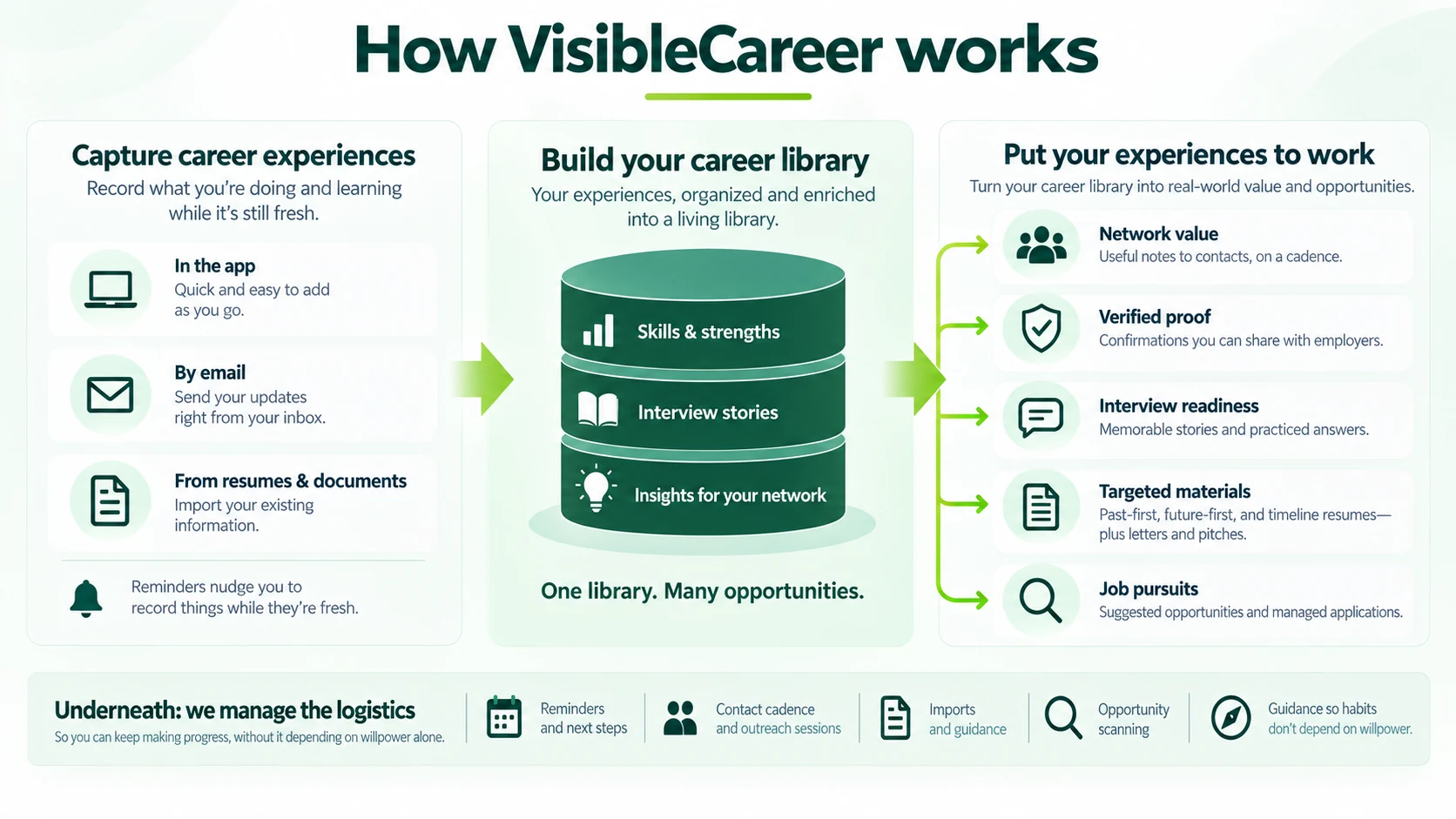
Ease of use through constant support & guidance
People don't regularly conduct network or capture discrete career experiences because the activities are unfamiliar, time-consuming, and outside their normal routine. The application is designed to make these activities quick and natural, including reducing the effort to get started.
Setup Wizard. A guided conversation after signing up steers you through importing information you already have (e.g., a resume, contacts), adding experiences and professional brand elements, and drafting first deliverables, including an untargeted resume. You can pause or end it from COMPASS, then ask COMPASS to restart it later. Completed steps are skipped.
COMPASS. COMPASS in the left nav answers how-to questions, helps you navigate to other areas, and creates tasks to simplify managing your work.
Recommendations. COMPASS will provide guidance when you ask on next steps. Also, support areas with several choices usually suggest the activities that you would likely find most valuable.
Flexible entry. Enter information or commands in the application or by sending email without opening it.
PUTTING YOUR CAREER LIBRARY TO WORK
Network
Historically, building and maintaining a healthy network is very difficult, much like managing a large sales and marketing pipeline where you constantly need to deliver value to each prospect, but without the benefit of software and a stream of content marketing materials. The application makes it easy to mine your routine activities to identify and articulate the value you deliver to your contacts, and to manage the logistics of delivering it.
Manage contacts. Organize people in your network with different outreach cadences, groups, interest tags, interaction history, and notes.
Develop insights and Value Briefs. Easily capture insights and lessons learned and turn them into value briefs you can use to engage your network.
Run communications sessions. Walk through contacts whose cadence is due, leverage a value brief, draft a message, send, and log the interaction.
Verification
It is hard to prove the claims you make on your resume or in an interview, making many readers skeptical, especially of your most exceptional accomplishments. The application lets you easily and credibly gather and maintain confirmations of your experiences and accomplishments from supervisors, colleagues, and others who can attest to them, something you can't do on your own.
Request verification. Ask a (former) supervisor or colleague to confirm an experience, skill, strength, or parable, ideally when the situation is still fresh in their mind.
Use verified assets. Share verified items on proof pages to increase your credibility and differentiate yourself from other candidates.
Deliverables
Most career guidance inadvertently makes one candidate similar to the others. The application guides you in applying techniques such as crafting forward-looking language that will effectively differentiate you.
Draft Past-first style resumes. Build Past-first style resumes of what you have done — ATS-oriented documents with role/context experience summaries and accomplishment bullets. You can build general ones or target them to specific job pursuits or people.
Draft a Da Vinci-style Resume. Create a future-first resume. Summaries (overall and per experience) state generally what you can do for a future or target employer — without packing proof into the summary; bullets supply the evidence. You can create general ones or target them to specific pursuits or people.
Draft elevator pitches. Draft short verbal summaries of your professional identity, with versions for different contexts.
Generate cover letters and other communications. You can generate cover letters from material in the career library for specific job pursuits and people. The same is true for other communications like requesting warm introductions, interview-specific cover letters, follow-up communications, and requesting support from other network members.
Share deliverables and proof pages. You can share resumes and other items via links.
Job search and pursuits
Managing all the activities for a single search—much less dozens—can feel overwhelming and lead to errors that undermine your application. The application makes it easy to manage any number of job searches simultaneously and hyper-tailor communications, resumes, and interview responses.
Run proactive job pursuits. Set up automatic job searches and review scored listings.
Open a Targeted job pursuit. Use a guided workspace for a specific company and role to manage contacts, resumes, communications, and interview preparation, starting with developing a way in all the way through job acceptance.
Interview preparation
Like deliverables, candidates' interview answers tend to blend together, leaving everyone seeming similar. The application helps you develop parable-style stories that interviewers will not only remember, but will want to share with colleagues and family.
Write parables. Create memorable structured interview stories framed as lessons learned.
Build an interview answer bank. Prepare and practice effective responses to common questions.
Prepare for potential questions from specific interviewers. Develop questions tailored to a particular job opportunity and/or the person interviewing you. Then draft and practice effective responses.
ENTERING & MANAGING YOUR CAREER LIBRARY
Import career information
Most professionals have already captured important career information in documents like resumes. Recreating it in a new environment is time-consuming. The application can import career information from most formats, including some like performance reviews that most people fail to leverage, and convert it into usable structured data with little effort.
Import a resume or CV. Upload an existing resume or CV in multiple formats or paste it in. The application extracts roles, skills, and strengths for you to review before saving as Experiences that the application can help you craft into a variety of valuable career resources.
Import performance reviews, assessments, and other career documents. Other career documents can provide insights into your strengths, skills, and other capabilities as well as parables.
Import contacts. Download your LinkedIn data archive (LinkedIn does not offer contacts-only), then upload Connections.csv — or use another contact list CSV.
Review imports before saving. Extracted items are held for review. You confirm, edit, or dismiss them before they enter your career library.
Career library
Most people only formally capture their career experiences and accomplishments when they revise their resume, by which time they have forgotten the majority of the skills they applied, the strengths they demonstrated, their accomplishments, and what they learned, information that could support them in job pursuits. The application makes it quick and easy to capture these achievements weekly and build a much more robust career portfolio.
Record your career experiences. Store roles, projects, achievements, and lessons in Experiences.
Identify your skills and strengths. Skills are observable capabilities; strengths are underlying patterns that explain why you are effective across contexts.
Set positioning briefs and points of view. Positioning Briefs steer what to lead with and what sets you apart. Points of view are durable opinions that provide consistency in value briefs you create for contacts in your network.
Export your career work. Download your data anytime from Profile & Settings as JSON files by area, including one file per pursuit, plus uploaded documents. Use the export directly or with other applications — you are never locked in.
WORKING WITH OTHERS
Support from others
You don't have to go it alone. You can give someone else access to your account like a parent, friend, accountability partner, or coach—even a grandparent. Or they can set up their own account, and you can assign them as a coach, which lets you track what they do and reverse or modify it if you want.
The home page describes the six disciplines to maximize employability that these capabilities support. Judgment Craft is the sixth. It is not one of the outputs in the diagram above.
Some recent use cases
Here are a few interesting ways some friends are using the application:
A grandmother supporting her grandchildren
A grandmother gifted annual subscriptions to her high school and college-age grandchildren. She scheduled time with each of them every other week to update their information. She wanted to do the work with them so they would build the habit of regularly managing their careers, and so they would spend more quality time together.
A father and daughter supporting one another
An attorney started the process himself, then purchased a subscription for his daughter, who works in marketing in New York City. They speak on Sunday evenings and update each other’s career experiences. They have designated each other as coaches.
A 50-year-old looking for career insurance
A professional in their fifties has a job and is not looking for another one. They use the application to keep delivering useful, specific value to people in their network, so that if the job ends, those contacts already have a reason to help rather than a sudden request for a favor.
A mid-career sales leader
A 40-something sales leader hired a career coach to do the initial upload of their career information and import their LinkedIn contacts. The coach works on a bi-weekly cadence with the sales leader to help them capture forgotten career experiences and parables, and build a routine for generating insights to share with the sales leader’s contacts.
A young software engineer
A 20-something software engineer is using the application to capture sharable project details and lessons learned whenever he completes one. He then asks the project lead to verify his write-up. He has also captured his first set of parables around recent projects.
Early positive feedback
Here are a few notes people have shared:
“I spoke with a recruiter who had read my [forward-looking] resume I created. She told me that I sounded different than everyone else. It was a great start... The CEO told me that one of the parables I developed was what ultimately convinced him to hire me.”
“It never occurred to me that my daughter's high school experiences actually told a compelling story. I had thought of her resume as something that was more like a scoreboard, not something that could demonstrate to a real company that she could provide real value in a summer internship.”
“I've been really pleased with my career coach, but now we have a platform where we can collaborate much more effectively. We get on a Zoom call, log in, and can work together quickly. The AI tools have been great tiebreakers when we don't agree. We also assign each other tasks when we aren't working together live.”
“My son landed his first job after college and is living at home to save money. Every day, I'd ask how his day was, and I'd get some version of 'fine.' It was like he had never left high school, although his tone was at least positive. Now, I'm using the application as an excuse to get him to share more about the work he is doing. I'm learning about his work. He's building out his career library and even has a few great stories now.”
“I'm surprised at how much my colleagues have appreciated the periodic messages I'm sending using the insight generation process in the application. They've introduced me to several other people over the past few months without me asking, including one with someone who was looking to fill a position. It wasn't the right fit for me, but I'm optimistic that it won't be the last time one of them brings me an opportunity.”
“I thought of my job as pretty much rinse and repeat until I started capturing project work I was completing every week. I had never appreciated how much I was learning. I'm sure writing this information down is going to help in my career, but I'm enjoying the job I have more now.”
Your work on VisibleCareer belongs to you. You can export it anytime from the application to use directly or with other tools — you are never locked in.